Lovable API: What It Can and Can't Do
The Lovable API went GA on September 11, 2026 (that date is literally the version string, Lovable-Version: 2026-09-11), and the first thing most people try to do with it is the one thing it doesn’t do. They want to send a prompt from a script. “Build a pricing page”, fire it from Zapier, get a project back. The REST API can’t do that. It manages projects that already exist: it lists them, changes their settings, publishes and unpublishes them, hands out embed links, and reads analytics and security scans. Building and editing live somewhere else.
That split is fine once you know it. It’s annoying when you find out after buying the plan.
What the Lovable API covers
Base URL is https://api.lovable.dev, everything sits under /v1, and you authenticate with a workspace key in a Lovable-API-Key header. Keys start with lov_. The resource areas, per the docs:
- Projects: list, get, update settings, delete.
- Deployments: publish or unpublish, check deploy status, change publish settings.
- Embed: a URL valid for one hour that shows a project’s built preview on an HTTPS origin you name. Not the editor, not the published app, and your visitors don’t need a Lovable login.
- Workspace: settings, members, groups.
- Analytics: per project and across the workspace.
- Security: poll the security scan for each project, read workspace security insights.
Two reads are Enterprise only: a project’s PII labels and the per-project security inventory. Everything else works on Business.
There’s no credit endpoint. You can’t ask the API how many credits a workspace has left, which is the number most agencies actually want on a dashboard (the MCP server’s get_workspace does return it, more on that below). And there’s nothing for code, git history or the database either.
The plan gate
Creating API keys needs a Business or Enterprise plan and an owner or admin role. Pro can’t do it, full stop.
We had a founder on Pro last month who wanted a “publish” button inside their own admin panel, so a non-technical co-founder could push copy changes live without opening the Lovable editor. Reasonable idea. Their plan was $25 a month and Business is $50 for the same 100 credits, so the button cost them $300 a year before anyone wrote a line of code. They did it anyway, because the co-founder was going to break something in the editor otherwise. I’d have made the same call. Just know the price before you scope the feature.
The API itself is free on top of the plan. Lovable says there’s no separate API pricing and that none of the current endpoints spend AI build credits, publish builds included.
Want to build or edit? That’s the MCP server
Creating projects and sending prompts goes through the Lovable MCP server at https://mcp.lovable.dev. It works on every plan, Free included, and it’s built for AI clients and editors like Cursor, VS Code or ChatGPT. Tools include create_project, send_message, read_file, get_diff, deploy_project and query_database.
(“Lovable MCP” also covers two other features, chat connectors and publishing your own app as an MCP server; the Lovable MCP post sorts out all three.)
Three things about it that matter more than the tool list:
It only does OAuth. There is no API key option, so it’s awkward for a headless cron job and fine for a developer sitting in an editor.
The scope is your whole account. Whatever client you connect can read and edit every project you can, and query_database runs SQL with your full permissions, writes and schema changes included. Connect it from your own machine, not from a shared box.
Only create_project and send_message cost credits. The reads are free. We lean on that a lot: when a client hands us a Lovable project, list_files, read_file and get_diff let us look through the code and the last few edits without spending a single credit or touching their editor. That alone is worth setting up.
One more catch on deploys. deploy_project refuses to publish while the latest security scan has unresolved critical findings. You get a 400 with type security_critical_findings and a finding_refs list naming the blockers. If your release script suddenly “breaks”, check the Security view before you check your code.
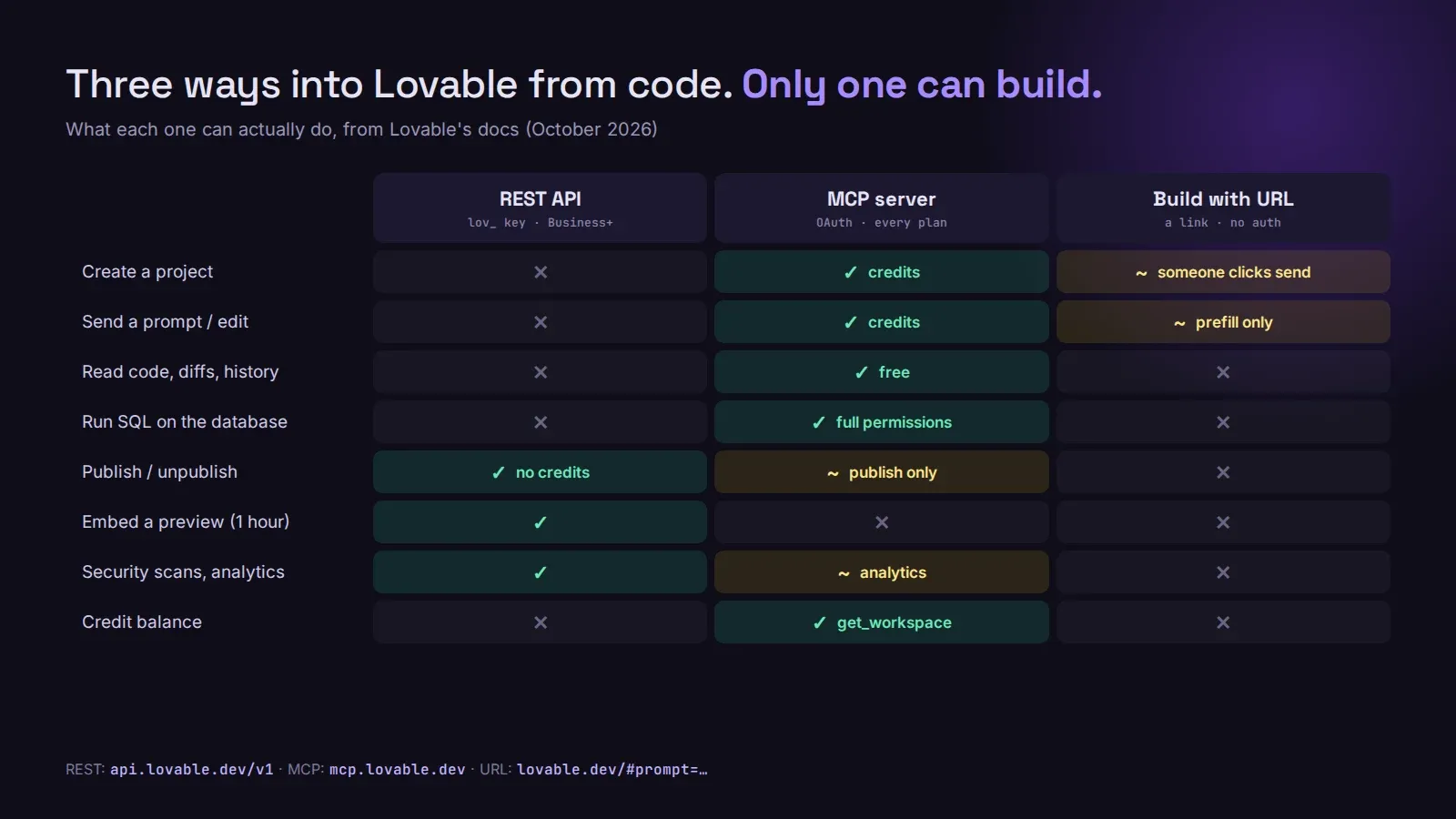
The third option, Build with URL, is just a link. https://lovable.dev/#prompt=... opens Lovable with the prompt filled in, and someone still has to click send. Lovable ignores the old autosubmit=true parameter now. Good for a “Build this with Lovable” button on a tutorial, useless for automation.
Setting up a key without regretting it
Keys are created under Workspace settings → Access tokens. Each one gets a name, scopes, an expiry and two optional guards that most people skip.
Scopes. Projects and Workspace, each None, Read, or Read & write. A reporting dashboard needs Read on both and nothing more. Scopes are fixed at creation, so if you guessed wrong you make a new key and revoke the old one.
Credit limit. A monthly cap on AI build credits the key can spend, resetting at 00:00 UTC on the 1st. No current endpoint spends credits, so today it does nothing. Set it anyway. The day Lovable adds a build endpoint, you’ll be glad an old integration key can’t drain the workspace.
IP allowlist. A CSV of addresses or CIDR ranges, up to 3,000 rows. The list must include at least one IPv4 entry, because the API only answers over IPv4 right now, so an IPv6-only allowlist locks you out with 403 ip_restricted.
Two small things that have bitten people:
- If you store the key as a secret inside a Lovable project, don’t call it
LOVABLE_API_KEY. Lovable already creates a secret with that exact name in every project and reserves theLOVABLE_prefix.LOV_PUBLIC_API_KEYworks. - Pin
Lovable-Versionon every request. Leave it off and you get the oldest supported version, which only moves when that version retires. That’s the kind of thing that changes under you on a random Tuesday.
Also, POST isn’t idempotent. A publish that timed out may still have gone through, so poll the deploy status before you retry. And if a lov_ key ever lands in a public GitHub repo, GitHub’s secret scanning reports it and Lovable revokes it automatically, which is nice, but your integration goes down at the same moment.
What we’d actually use it for
A client portal that embeds the preview of the build you’re doing for them. A weekly script that pulls security scan results for every project in an agency workspace and posts the critical ones to Slack. A release button for someone who shouldn’t be in the editor. Traffic numbers for a client report.
What we wouldn’t do is build a product on top of it that depends on endpoints Lovable hasn’t shipped. If you need prompts from code, that’s MCP with a human logged in. And if the real problem is that the app has outgrown being managed through Lovable at all, that’s a different conversation: our Lovable Cloud to Supabase migration moves the backend somewhere a developer can work on it directly, and the way we work is laid out if you want the whole app taken to production.