Lovable Cloud: What You Actually Get
Lovable Cloud is the backend Lovable switches on for you the first time your app needs to save something. Ask for a login page or a table of orders and it appears: a database, auth, file storage, edge functions, a place for API keys. Lovable’s docs say it plainly, it runs on Supabase’s open-source foundation. So when people ask us “what database does Lovable use”, the answer is Postgres, inside a Supabase project that Lovable owns and you rent.
That one sentence explains most of what follows, good and bad.
What’s in the Cloud tab
Open your project, go to Cloud, and you get a cut-down Supabase dashboard with Lovable’s names on it:
- Database: your tables, row editing, the RLS policies, and backup restores.
- Users: who has signed up, and which sign-in methods are on.
- Storage: buckets and the files in them.
- Edge functions: the server-side code (Stripe webhooks, emails, anything with a secret key).
- Secrets, Logs, plus Emails, Jobs, an SQL editor, Usage and Advanced settings.
It’s a decent set. The SQL editor alone saves a lot of “please add a column” prompts. What you don’t get is the real Supabase dashboard, the service_role key, or a direct Postgres connection string you can hand to another tool. That gap doesn’t matter while you’re building. It starts to matter the day you want a BI tool on your data, a second app on the same database, or a contractor who works in a normal IDE.
The settings that will bite you later
Region is forever. You pick Americas, Europe or Asia Pacific (or “Closest to me”) through the “Where project data is stored” setting, and once Cloud is enabled on a project it can’t be changed or moved. If your customers are in Germany and the project got created on a US default, the only fix is a new project and a data move. Check this before you have real users, not after.
The instance is small until you pay. Advanced settings lists six sizes: Tiny, Mini, Small, Medium, Large and X-Large. Free projects sit on Tiny. The docs don’t publish CPU or RAM numbers for any of them, which I find annoying, so you’re judging by the resource health cards (CPU, Memory, Disk over the last 24 hours, with “pressure” segments when you hit the ceiling). A resize takes a few minutes and briefly drops the database while it restarts. Do it at 3am your users’ time, not during a launch.
Also, the names moved on July 31, 2026. Old Medium became Large, old Large became X-Large, and a new Medium was slotted in between. If you read a forum post from before August about “Medium being enough”, it was talking about a different box.
Disk only grows. Database storage has an 8 GB minimum, can be raised up to four times in 24 hours, and can’t be shrunk. Same rule as Supabase itself.
Dangerous migrations are off by default. Each Cloud tool has Always allow, Ask each time or Never allow. Most default to Always allow. The one that defaults to Never allow is “Execute backward incompatible database migrations”, which covers dropping or renaming tables and columns. Leave it there. If the agent wants to rename profiles.name to profiles.full_name, you want to see that coming.
How Lovable Cloud is billed
Cloud doesn’t have its own invoice any more. Database, storage, compute, network, realtime and the AI features in your app all spend Run credits from the same balance you build with. Free, Pro and Business each get a 20-credit monthly Cloud grant and a 4-credit AI grant on top, and neither rolls over.
The part that matters for a live product: when the balance hits zero, the published site stays up but the Cloud backend can pause. Paused means no database, no auth, no storage, no edge functions. Your landing page loads and nobody can log in. We wrote up the full credit math in our Lovable pricing post, so I won’t repeat it here. If you’d rather see it for your own app, the free Lovable cost check scans your repo and estimates what Cloud costs you against running the same backend yourself.
Usage lives under More, Cloud, Usage, broken down by category for up to 90 days. Look at it once a week if you have paying users. It’s the only early warning you get.
What the export takes, and what it leaves behind
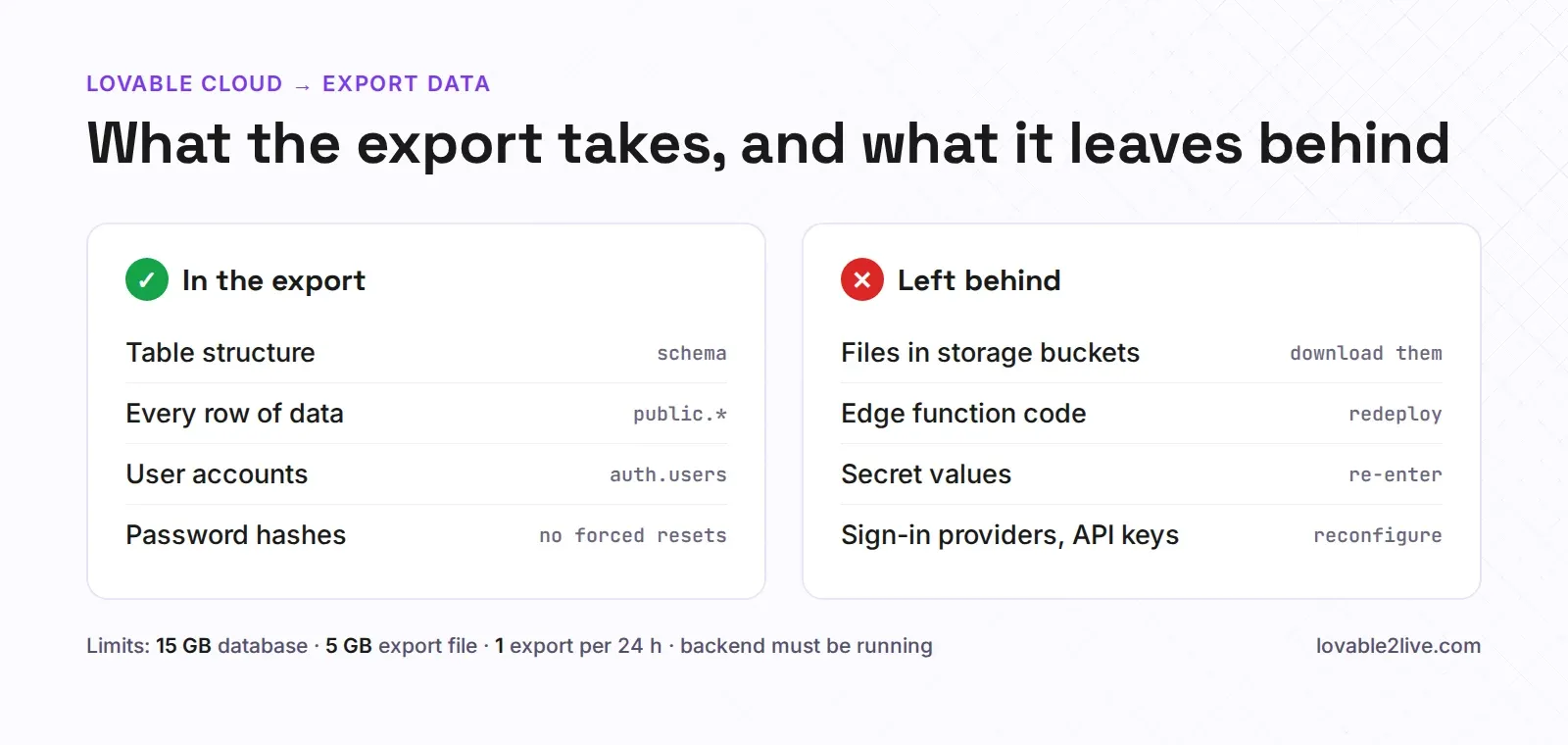
Lovable Cloud has a native export now, which is a real improvement. It gives you the whole database, structure and data, including user accounts and their password hashes. So your users won’t need to reset passwords when you move, as long as the destination is Supabase Auth, which reads the same bcrypt hashes.
It does not include your storage files, your edge function code, or your secrets. Sign-in provider settings (the Google OAuth client, redirect URLs) and API keys have to be set up again at the destination too. There are hard limits: databases up to 15 GB, export files up to 5 GB, one export per 24 hours, and the backend has to be running when you start it. A project paused for zero credits has to be woken up first.
We had a founder come to us last month with a “finished” export and a new Supabase project already set up. Tables, rows, users, all there. Then their first customer tried to open an invoice PDF and got a 404, because the 2,300 PDFs were in a Cloud storage bucket that the export never touched. The database rows still pointed at the old bucket URLs. Not hard to fix, but it’s exactly the kind of thing you find on a Monday morning from an angry email.
And don’t press Remove until you’ve checked everything. “Remove Lovable Cloud” deletes the instance permanently, and exports can’t be downloaded after it’s gone.
Is Lovable Cloud enough?
For a prototype, a demo, or an internal tool with a dozen users, yes. Leave it alone and build. It’s genuinely convenient, and the alternative (wiring up your own Supabase on day one) is work you don’t need yet.
It stops being enough when any of these are true: you need the service_role key or a direct connection for another service, you want your backend bill separate from your build credits, you care which region your data lives in and got it wrong, or your app can’t afford to go dark because someone on the team used up the credits on a redesign. Moving from Cloud to your own Supabase is manual (Lovable’s docs say so, there’s no one-click switch), and the comparison of Lovable Cloud vs Supabase goes through the trade-offs side by side.
If you’re past that point, our Lovable Cloud to Supabase migration moves the database, users, storage files, functions and secrets for a fixed price, and you keep building in Lovable afterwards. The free migration checker tells you how big the job is first.