Lovable Hosting: What You Get and Pay For
People ask us about Lovable hosting as if it were a separate product you pick, like Netlify or Vercel. It isn’t. When you hit Publish, Lovable hosts the app, and there is no hosting plan to compare, no server size to choose and no bill that says “hosting” on it. That is mostly good news. The part that confuses people is everything around it: which bits cost credits, what a custom domain needs, and what actually happens when you try to host a Lovable app somewhere else.
Everything below was checked against Lovable’s own docs on October 17, 2026.
What Lovable hosting gives you
Publishing takes a snapshot of your project and puts it live on a lovable.app address. HTTPS is set up for you, including on a custom domain, and the site is served from locations around the world, so a visitor in Sydney isn’t waiting on a server in Virginia. The snapshot part matters more than people expect: whatever you change after publishing stays in the editor until you click Publish changes. Half the “my fix didn’t go live” messages we get are this.
Publishing to lovable.app is free on every plan. A custom domain needs a paid plan. Your plan doesn’t cap visitors or bandwidth either, with one exception: on the Free plan, apps created from May 13, 2026 get 1,000 server requests per project per 10 seconds, and anyone over that sees an “App temporarily unavailable” page for a minute. Fine for a side project, a bit nervy if you’re about to be on a podcast.
Hosting is free. The backend isn’t.
This is the line to remember. Lovable’s docs say a live site doesn’t consume credits on its own. What costs money is the work your app does while it runs: database reads and writes, file storage, network traffic, edge functions and any AI calls your users trigger. Those all draw from the same credit balance you build with, under the name run credits. There is a temporary grant of 20 Cloud credits a month on Free, Pro and Business, plus 4 for AI, and anything above that comes out of your credits.
So “how much does Lovable hosting cost” has an annoying answer. The pages are free, and the app behind them is metered. A brochure site with a contact form costs close to nothing. A marketplace where every page load runs six queries and a thumbnail resize does not, and that bill grows with your users, not with how much you build. If you want the number for your own app, the free Lovable cost check reads your repo and estimates what running it costs on Lovable Cloud and on three other setups.
Running out of credits doesn’t take the site down, by the way. The pages stay up, but anything that leans on the backend or AI can pause until credits come back, and a paused backend might need you to open More, Cloud, Overview and click Wake up. A site that loads with every form broken is arguably worse than one that’s down.
Hosting a Lovable app somewhere else
You own the code, and you can host it anywhere. How hard that is depends on which of two stacks your project is on, and most guides online were written before the second one existed.
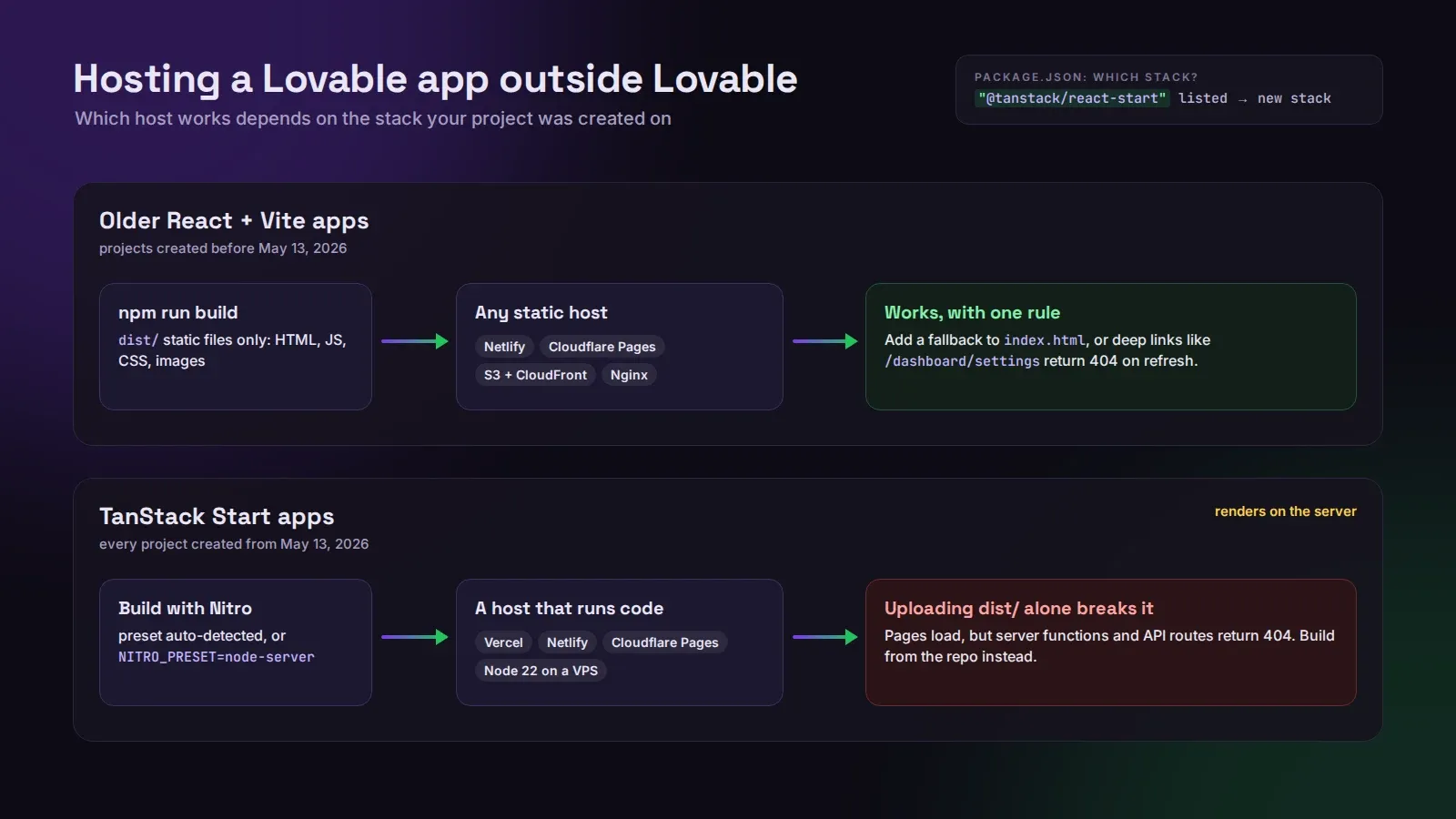
Older React + Vite apps build to a folder of static files in dist/. Any static host works: Netlify, Cloudflare Pages, an S3 bucket behind CloudFront, plain Nginx. The only gotcha is client-side routing. Without a fallback to index.html, every deep link like /dashboard/settings returns a 404 on refresh, and you’ll find out from a user, not from testing the home page.
TanStack Start apps, which is every project created from May 13, 2026, render on the server. They need a host that runs code, not one that only serves files. The build uses Nitro, which picks a preset for the platform it detects. Vercel, Netlify and Cloudflare Pages are detected automatically. For a VPS or a container you build with NITRO_PRESET=node-server npm run build and run it with Node 22.
We had a founder last month who moved a new TanStack Start app to Netlify by dragging the dist folder into the deploy box, the way he’d done with an older project. The home page loaded fine, so he switched the domain. Every server function returned a 404, which meant signup was broken for about six hours before anyone wrote in. Static upload versus a real build from the repo, and the difference didn’t show up on the one page he checked.
To find out which stack you’re on, open package.json in the Code tab. If it lists @tanstack/react-start, you’re on the new one.
The frontend is the easy half
Moving the pages takes an afternoon. What people really want, nine times out of ten, is to stop paying run credits for the database, and that means moving the backend. If you only move the frontend, your app keeps talking to Lovable Cloud, and the metered part of the bill doesn’t change at all.
The environment variables are where this bites. A TanStack Start app on Cloud needs four values on the new host: VITE_SUPABASE_URL and VITE_SUPABASE_PUBLISHABLE_KEY for the browser, SUPABASE_URL and SUPABASE_PUBLISHABLE_KEY for the server. The VITE_ ones are baked in at build time, so setting them after the build does nothing. Then add your new URL to the sign-in redirect list, or login will bounce people back to the old domain.
Moving the backend is a different job: your database, users, storage files, edge functions and secrets go to your own Supabase project, and the app gets pointed at it. Lovable’s export covers the database and users, but the rest you carry over by hand. That’s the job we do as a fixed-price Cloud to Supabase migration, and you can keep building in Lovable afterwards.
Should you leave Lovable hosting at all?
Mostly no. If your app is a frontend plus a modest backend, Lovable hosting is fast, has HTTPS and a CDN, and costs you nothing until the backend works hard. We’d leave it alone.
Move the frontend when you need your own deployment pipeline, a compliance rule says where the app must run, or you’re adding a second app that shares the codebase. Move the backend when run credits have become a real line on your bill, or when you need things Cloud doesn’t give you: your own Postgres extensions, direct database access for a reporting tool, a staging copy of production data.
If you’re somewhere in between and not sure which half is costing you, run the cost check first. If you’d rather hand the whole move to someone, our pricing is on the site.