Claude Code vs Cursor for a Founder's App
Claude Code or Cursor? If you are a founder who doesn’t read code, pick Claude Code and run it on the $20 Pro plan first. If you or someone on your team reads diffs line by line, Cursor’s editor makes that easier. That is the short answer, using the pricing pages as they stood on November 17, 2026. The longer answer is that the choice matters a lot less than what you put around either tool, and I’ll get to that, because it is where the apps we get sent actually break.
What they cost right now
Both companies changed their plans this year, so ignore any comparison older than a few months.
Claude’s pricing page lists Pro at $20 a month ($17 a month if you pay $200 for the year), Max at $100 for “5x Pro usage”, and Ultra at $200, which drops the 5-hour limit for verified accounts and gives “10x Pro usage” a week. Claude Code is included on every paid plan. The free plan doesn’t include it. Limits reset every 5 hours and every week, and how fast you hit them depends on the model you pick. Team seats are $25 a month billed monthly ($20 annually), or $125 for a premium seat.
Cursor’s pricing page looks quite different now. Plus is $8 a month and only runs Grok models. Premium is $30 and adds third-party models “at API list price”, which means the Claude and GPT models inside Cursor are billed on top, by usage. Super is $100 (15x Plus usage) and Ultra $200 (50x). Allowances refresh weekly, and when you run out you either buy top-offs or wait. You can set a spending cap, and you should, on day one.
So the honest monthly number for a founder building most days: Claude Code is $20 until you keep hitting the weekly wall, then $100. Cursor is $30 plus whatever the third-party model usage comes to, unless you are happy on Grok only. I’d budget $60 to $100 for Cursor if you want the same models you’d get in Claude Code. What drains a Claude Code plan faster than you’d expect, and when paying per token through an API key is cheaper, is in our Claude Code pricing breakdown.
Where you actually work
Cursor is an editor. It’s a fork of VS Code with the AI built into every panel, and you see the files, the tabs and the diff the whole time. That’s great if you understand what you’re looking at. It’s a wall of green and red if you don’t.
Claude Code started as a terminal program (claude in your project folder) and now runs in VS Code and JetBrains, a desktop app, the browser and the phone app too, according to its own overview page. The same engine sits behind all of them, so a project’s settings follow you around. Most non-technical founders I talk to end up in the desktop app because it shows diffs visually and runs a few sessions side by side.
There’s a funny overlap here: Claude Code ships an extension for Cursor. Plenty of people run Claude Code inside Cursor and pay for both. I don’t recommend it unless you have a reason, because now you have two usage meters to watch.
The instruction files (this is the part that matters)
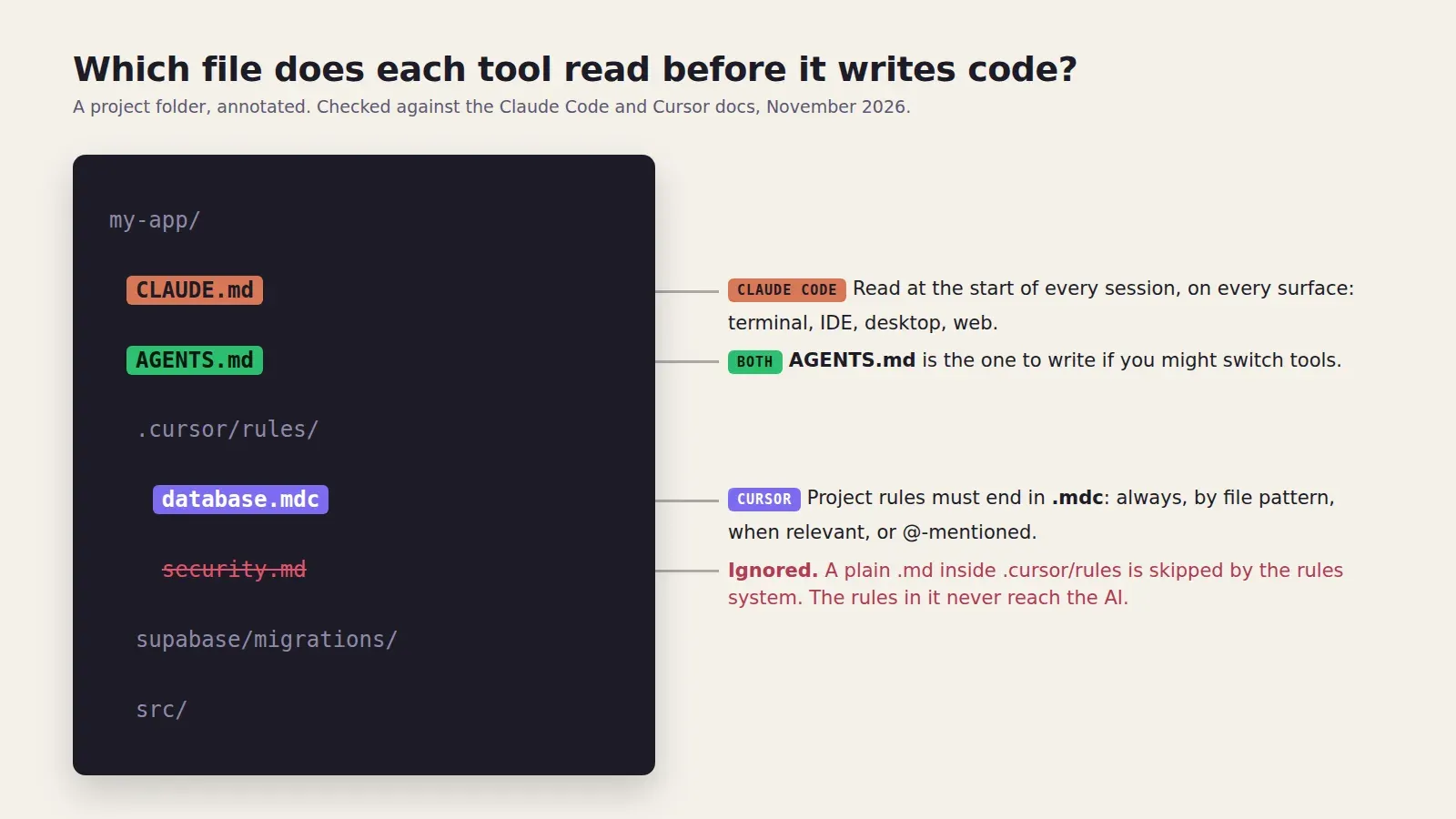
Both tools read a plain text file of rules from your repository before they write anything. This file is the closest thing you have to a senior developer sitting next to the AI.
Claude Code reads CLAUDE.md in the project root at the start of every session. Cursor reads project rules from .cursor/rules/, and those have to end in .mdc. The Cursor rules docs are blunt about it: a plain .md file in that folder “is ignored by the rules system”. I’ve seen a team keep a careful security.md in there for weeks, wondering why Cursor kept putting a Stripe secret key in a client component. It never read the file once.
Both also understand AGENTS.md, which is the one file to write if you might switch tools later.
What goes in it doesn’t depend on the tool. The lines we add to almost every client file:
- Never edit a migration that has already run. Write a new one.
- Every new table gets row level security in the same migration, with a policy that checks
auth.uid(). - Secret keys only in server code. Anything starting with
VITE_orNEXT_PUBLIC_is public, treat it that way. - Run
npm run buildand the tests before you say you’re done.
The last one sounds obvious. It’s ignored constantly unless it’s written down.
A story about the wrong question
A founder sent us a booking app in October. He had built it with Cursor, then switched to Claude Code halfway “because it was smarter”, and wanted to know which one had broken his checkout. The answer was neither. Both had done exactly what he asked. Somewhere in week three he had asked for “make the admin page faster”, and one of them had replaced a database call with a cached list that never refreshed. Paid bookings stopped showing up for staff. Nobody noticed for nine days because nothing ran a test, nothing reviewed the change, and the deploy happened the moment he clicked accept.
Swapping the tool wouldn’t have caught that. A pull request with a second pair of eyes would have, in about two minutes.
What neither tool does for you
Neither one sets up a staging copy of your app, runs a security scan on each change, keeps backups of your database, or tells you a migration will lock a table with live users on it. Both will happily do any of those if you ask, and both will happily skip them if you don’t. That’s the gap, whichever logo is on the app.
If your app is about to take real money or real user data, we take Claude Code and Cursor apps to production at a fixed price from $500, usually in 5 to 7 days: details on the job page. If you want to keep building with the AI yourself and have someone review what it writes, that’s our AI build partner retainer, from $500 a month after a one-time setup from $600. And if you are still deciding whether to build it yourself at all, the app development cost calculator puts the AI-built route next to an agency quote.
Pick the tool you’ll actually open every day. Then write the rules file before the next feature.