Lovable AI Gateway: What It Bills, What Breaks
The Lovable AI gateway is the built-in connector that lets an app call AI models without its own OpenAI or Google account. Lovable gives each project a LOVABLE_API_KEY, runs the call through a backend function it writes for you, and bills every request to your workspace credits, after a 4-credit monthly grant that Lovable itself calls temporary.
That’s the whole deal in two sentences. What follows is what it means once real people use the feature, from Lovable’s page “AI features for your app”, checked on November 6, 2026. The page has no date on it and the model list changes often, so treat the model names below as a snapshot.
What you get without signing up anywhere
You ask for a chat box, a summary button or an image generator, and Lovable picks a model per job. The defaults today: GPT-6 Astra for chat, Gemini 3.1 Flash Lite or GPT-6 Luna for cheap high-volume text, GPT Image 2.5 Sunburst for images, Gemini Embedding 2 for search by meaning, GPT Transcribe for speech to text, and a typed-decision model called Jev 1.13 for classify, route and score jobs. Apps created from May 13, 2026 (the TanStack Start ones) can also use Claude models.
The key never reaches the browser. Chat streams back over server-sent events. Live voice is the one exception: the browser streams audio straight to the voice model, and your server only opens the call.
Honestly, for a prototype this is great. No provider account, no billing setup, no key pasted into a .env that ends up on GitHub. I’ve seen that last one happen more times than I’d like.
How it bills
Every AI request spends credits, and the price depends on the model and the work: text tokens, images, seconds of video, finished music tracks, and for live voice the connected time, silence included, with a 15-second minimum per call. Priority processing for chat costs more than standard.
Free, Pro and Business workspaces get a 4-credit monthly AI grant for deployed apps. It’s spent first, it doesn’t roll over, it resets on the 1st at 00:00 UTC on Free and with the billing cycle on paid plans. At the Pro rate of $25 for 100 credits, 4 credits is about a dollar of AI a month. That covers your own testing. It doesn’t cover launch week.
The docs give no per-token rates. You see what you spent after the fact, in More → AI (credits used, requests, success rate, average time; 24 hours of history on Free, 90 days on paid) and in Workspace settings → Plans & credit usage → Usage details → Run credits.
One line in the FAQ settles a question we get a lot: you can’t plug your own OpenAI key into the built-in connector to stop it eating credits. It always bills through Lovable. The way out is a backend edge function that calls the provider directly with your key stored as a secret. Then the provider bills the tokens, and Lovable still bills the Cloud usage for running the function.
The two errors that will page you
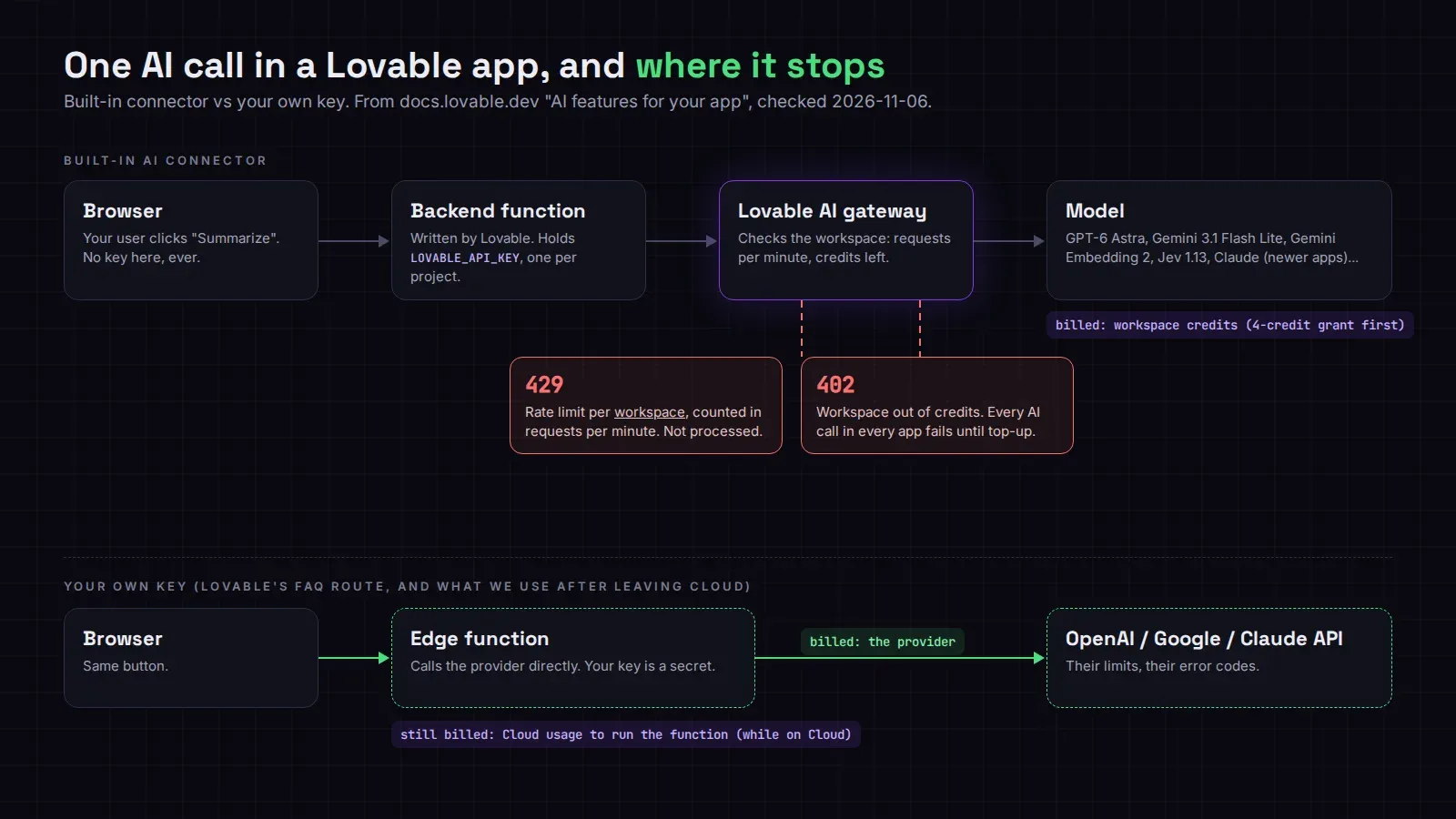
429 Too Many Requests comes from the rate limit, which is per workspace and counted in requests per minute, not tokens. The request isn’t processed at all. Per workspace matters: if you have a staging app and a live app in the same workspace, a load test on staging can throttle the live one.
402 Payment Required means the workspace is out of credits. Every AI call in every app in that workspace fails until someone adds credits or turns on auto top-up.
Here’s how that looks in practice. A founder we work with had an “explain this invoice” button that summarized PDFs for his customers. Launch day went fine. On day four, a Sunday, his workspace ran dry at about 3 am UTC because the agent had also been burning credits on a redesign that weekend. The button didn’t show an error. The generated code caught the 402 and rendered an empty card, so for nine hours his customers saw a blank box and assumed the feature was just bad. Nobody looked at More → AI until Monday.
So, two cheap fixes before you launch an AI feature. Show a real message when the call fails, with the status code in your logs. And turn on auto top-up, or keep a separate workspace for the live app so building doesn’t drain it.
A couple of hard limits too: video runs 1 clip at a time per project on Free and 10 on paid plans, live voice 5 calls at a time per workspace on Free and 20 on paid. If you need more, Lovable’s answer is to upgrade or contact support.
Things the admin switches can do to you
The connector is on by default with Always allow under Connectors → AI. Business and Enterprise admins can disable the AI row for the whole workspace, and that stops AI calls in every app, published ones included. Enterprise workspaces only get zero-data-retention models unless an admin enables Extended-retention ones, and Claude, Gemini Omni 1.1 Flash and the ByteDance models aren’t zero-retention. With EU inference on, any non-EU model request just fails.
There’s also AI app context, which stores full requests and responses, secrets removed, for 90 days. It’s on by default on Free and Pro. If your users paste health or payment details into a chat box, that’s a privacy policy line you now need to write, or a switch you need to turn off.
What happens when you leave Lovable Cloud
The docs don’t say. The page only says the connector “works best” with the built-in backend, and it never describes the gateway outside Lovable Cloud. So don’t plan on LOVABLE_API_KEY following your app to your own Supabase project.
When we move an app off Cloud, we treat every gateway call as something to rewrite: find each function that calls it, replace it with a direct call to the provider (OpenAI, Google or the Claude API) with the client’s own key as a Supabase secret, and match the model as closely as we can. Image and voice features take longest, because the request and response shapes differ more. Budget for the provider bill too. It’s usually lower than the credits were, but it’s a new bill with a new card on it.
If you’re weighing that move, our free Lovable cost check reads your repo and estimates what your Cloud setup costs against running it on your own Supabase. The Cloud to Supabase migration starts at $150, and only your table count sets the price. And if the AI feature is the thing you’re about to launch, taking a Lovable app to production is the job where we add the error handling and the alerting this post is about.