Lovable Database: Backups, Limits, Export
The Lovable database is a managed PostgreSQL database that comes with Lovable Cloud, one per project, on Supabase’s open-source stack. You get a table browser, a SQL editor, daily backups kept for about 14 days, and an export capped at 15 GB. You don’t get point-in-time recovery, you can’t change the region after it’s created, and you can only install the extensions on Lovable’s list.
That’s the short version. The rest of this post is what those limits mean once real users are writing to it, from Lovable’s database docs and the backup and performance pages next to it, all checked on November 5, 2026. The docs carry no dates, so if you’re reading this in 2027, check them again.
Where it lives in the editor
Open More → Database. You see your tables with an approximate row count, and you can double-click any value to edit it. Under Manage there are six tools: Jobs, SQL editor, Edge functions, Backups, Policies and Settings. Settings shows the Database location row, which is the only place you’ll see the region and the Postgres version.
One line in the docs deserves to be in bold, so I’ll do it for them: edits in the Database view go straight to the database your published app uses. There is no staging copy. A founder we worked with fixed a typo in a plans table on a Friday afternoon by double-clicking the price cell. It was the price_id column, not the display name, and Stripe checkout failed for every new customer until Monday. The view doesn’t refresh live either, so he didn’t even see his own change until he hit Refresh.
Small things worth knowing: pages show 10, 25, 50 or 100 rows, row editing only works on tables with a single primary key, views are read-only, and there’s no import button. To load a CSV you attach it in the chat and ask Lovable to add the rows. CSV export does exist, and it exports every row matching your filter, not just the page you’re looking at.
How the schema changes
You ask in chat, Lovable writes a migration. New projects keep those in drizzle/migrations/ (older ones in supabase/migrations/), and the docs ask you not to touch drizzle/schema.ts or drizzle.config.ts.
The interesting part is what Lovable refuses to do. By default the agent permission Execute backward incompatible database migrations is set to Never allow, so it won’t drop or rename a column, change a column’s type, or add a required column without a default. Instead it adds a new column, copies the data across, and leaves the old one where it was.
That’s a sensible default for an app with users. It’s also how a six-month-old Lovable project ends up with status, status_v2 and order_status on the same table, two of them dead, and code that still reads the wrong one in one place. Set the permission to Ask each time once you know what you’re doing. You’ll see the SQL before it runs, which is how it should have worked in the first place.
Extensions: a fixed list
Supported: pg_cron, pg_net, pg_trgm, vector, btree_gist, btree_gin, unaccent, fuzzystrmatch, postgis and pgmq. Preinstalled: plpgsql, pg_graphql, pg_stat_statements, pgcrypto, uuid-ossp and pgsodium. Anything else is refused, in chat, in the SQL editor and through the API, which answers with a 403 and unsupported_extension.
For most apps that list is plenty. vector covers embeddings, pg_cron covers scheduled jobs, postgis covers maps. If your plan depends on something that isn’t there, find out now, not after launch.
Backups: daily, about 14 days, no rewind
Lovable takes one backup a day and keeps roughly 14 of them, listed under Manage → Backups with the time in UTC. Restoring is one button, Restore to this backup, and it can’t be undone: everything written after that backup is gone, and the database is down for a few minutes while it restores.
There is no point-in-time recovery. If someone runs a bad UPDATE at 4 pm and the last backup was at 2 am, you lose 14 hours of orders to undo it. The SQL editor does ask for confirmation before UPDATE, DELETE, DROP, TRUNCATE and ALTER, which helps until the day someone clicks yes.
Backups cover the database only. Files in storage are not in them.
Export: what it takes, and what it leaves behind
From Manage → Settings, Export data produces a compressed Postgres archive you load with pg_restore. Lovable emails you when it’s ready and you download it from More → Storage. The limits are the ones that matter if you’re planning to leave one day: databases up to 15 GB, an export file up to 5 GB, one export every 24 hours, and the database must be running. A project paused because it ran out of credits has to be resumed first, which means buying credits to get your own data out.
The export includes your tables, your data and your users with their password hashes. Here’s what it doesn’t include, from the backups page:
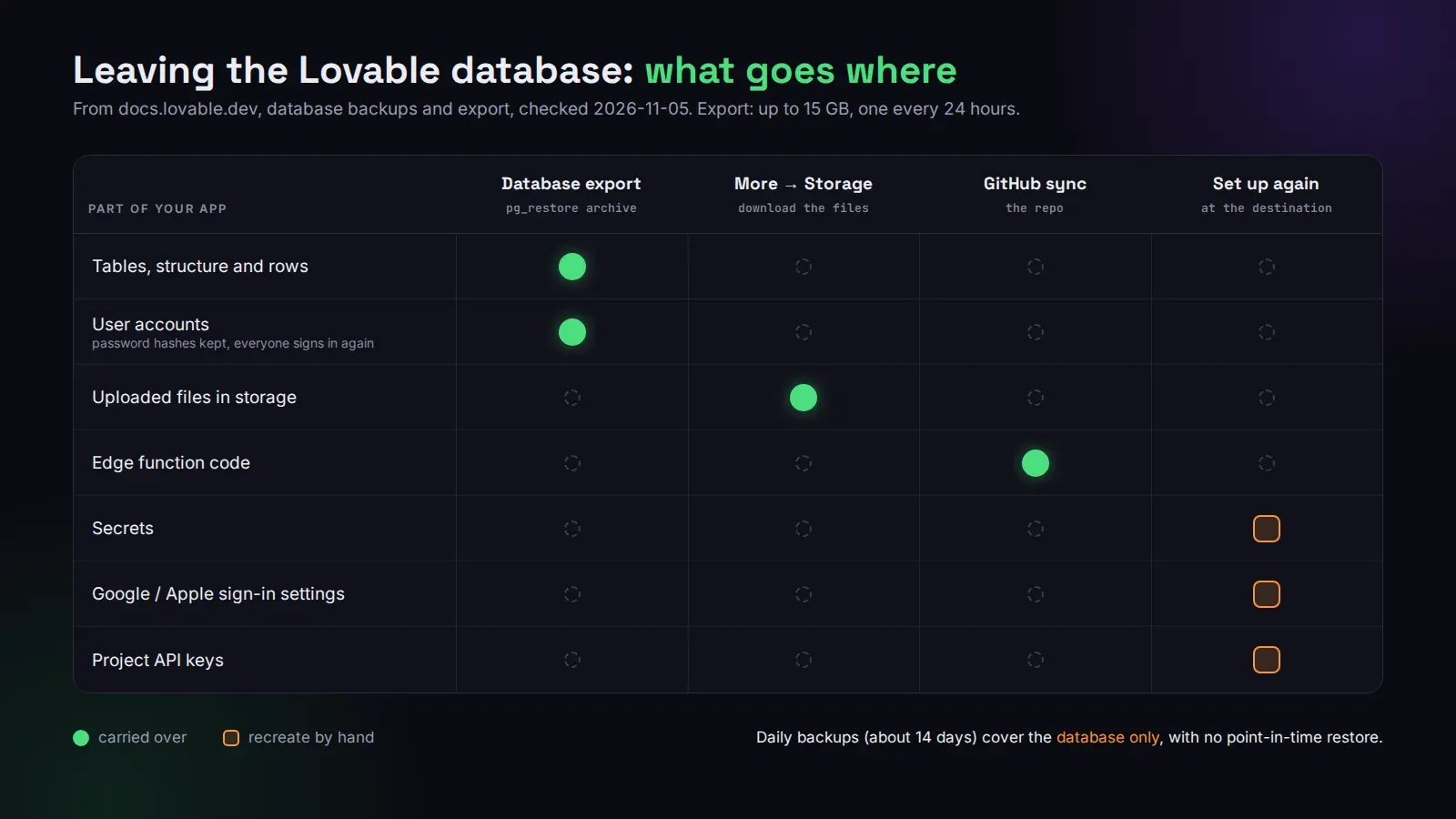
Storage files, edge function code, secrets, sign-in provider settings and project API keys all move separately. The code comes over with GitHub sync. The files you download yourself. Secrets and Google or Apple sign-in you set up again at the destination. Users keep their passwords after a restore into Supabase, but everyone who was signed in has to sign in again.
Sizes and what they cost
The Free plan is fixed at Tiny. Paid plans can pick Tiny, Mini, Small, Medium, Large or X-Large under Settings → Database size → Manage; a resize takes a few minutes with a short restart. Some older projects show 2X-Large, which can’t be selected again once you leave it. Storage starts at 8 GB, can grow up to 5 times per change and 4 times a day, and never shrinks.
Lovable doesn’t publish prices per size. Larger instances burn more Run credits per hour, and the Manage instance dialog shows an estimated monthly cost based on your last 30 days. The performance page also says to fix slow queries before resizing, and I agree with it completely. Nine times out of ten, a “we need a bigger database” problem is a missing index on a column the app filters by on every page load. Our free Lovable cost check reads your repo and estimates what your Cloud setup costs against running it on your own Supabase.
When it stops being enough
The Lovable database is fine for a lot of apps that will never outgrow it. We’d move off it when one of these is true: you need to restore to a specific minute, you need an extension that isn’t on the list, two projects need to share data (each Lovable project gets its own isolated database), or you need it in a region other than the one picked on day one.
The move is the export above plus everything it leaves behind. Our migration checklist lists every piece. If you’d rather not do it yourself, we do Lovable Cloud to Supabase migrations from $150, priced by table count, usually in 1 to 2 days, and full production hardening for apps that need backups and monitoring set up properly.