Lovable Figma Import: Plugin, MCP or .fig
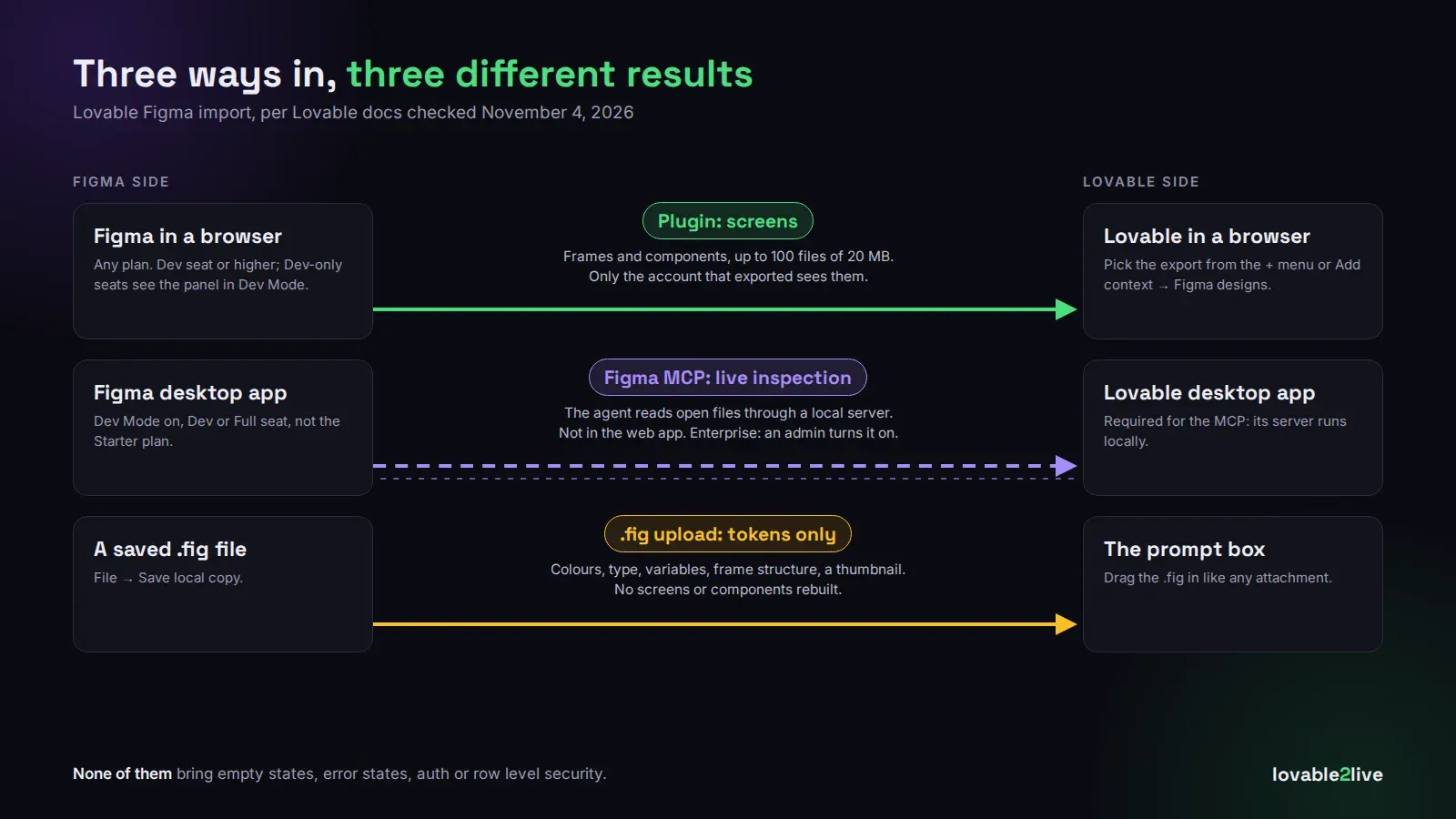
There are three ways to get a Figma design into Lovable now, and they do very different things. The Lovable Figma plugin exports frames and components into your workspace. The Figma MCP lets the Lovable agent read files open in your Figma desktop app, live. And a .fig file upload gives Lovable your colours, type and variables, but no actual screens. Pick the wrong one and you’ll wonder why Lovable “ignored” half your design.
All of this is from Lovable’s Figma docs, checked November 4, 2026. They carry no date, so check them again if you’re reading this much later.
The plugin: what most people want
Open Lovable: Import from Figma inside Figma, sign in with Lovable, type the pairing code it shows you, grant the permissions, select a frame or component and export. Then in Lovable you pick it from the + menu, or Add context → Figma designs in the project chat.
It works on every Figma plan and in the browser, no desktop apps needed. You do need at least a Dev seat in the Figma organisation, and if a Dev seat is all you have, the panel only shows up in Dev Mode. That one cost a client of ours twenty minutes of “the plugin is broken” before anyone noticed which mode the file was in.
Limits: up to 100 files per export, 20 MB each. A huge frame with every state of every screen laid out side by side will hit that. Split it up. Honestly you want to anyway, because Lovable builds a better screen from one clear frame than from a wall of forty.
Two things trip teams up. First, exports are visible only to the account that made them, not to the rest of the workspace. If your designer exports and your developer opens the project, the developer sees nothing. Second, the export itself is free, but the prompt you send with the design is ordinary build usage and spends credits like any other message.
The Figma MCP: live, but desktop only
This one connects the Lovable agent to the Figma desktop app through a local MCP server, so it can inspect whatever file you have open instead of a one-off export. Good for “match this spacing exactly” work.
The catch is the setup. You need the Lovable desktop app (the MCP server is local, so the web app can’t use it), the Figma desktop app with Dev Mode, and a Dev or Full seat on a paid Figma plan. Starter doesn’t work. On Enterprise Lovable workspaces an admin has to turn on local desktop MCP servers first, and they’re off by default. If you work in Lovable in a browser tab like most founders do, this method simply isn’t there for you. (If MCP in Lovable is new to you, we untangled the three different things Lovable calls MCP in this post.)
The .fig upload: tokens, not screens
File → Save local copy in Figma, then drag the .fig into the Lovable prompt. Lovable reads your variable collections, colours, typography and frame structure, plus a thumbnail of the layout. It does not recreate your components or your screens. The docs are clear about that, and people still expect it to.
Where it shines is pairing it with the other two. Upload the .fig once so the design tokens are right, then bring screens in with the plugin. The docs suggest combining methods this way, and in our experience it’s the difference between an app that looks “close” and one where the button greens actually match.
What none of them carry over
Figma gives Lovable a picture of the app. It doesn’t give it the app. Empty states, error states, what happens when a name is 60 characters long, what a logged-out user sees on a shared link: if your designer didn’t draw it, Lovable will guess, and the guesses look fine in the preview with three rows of demo data.
The bigger gap is behind the screens. A beautifully imported dashboard still needs real auth, row level security on every table that dashboard reads, and a backend that won’t fall over when a hundred people log in at once. We’ve taken over more than one Lovable app where the UI was pixel-perfect from Figma and every user could read every other user’s orders.
So import away, it really does save days. Just budget for the part Figma can’t show. If you’re at that point, Lovable to production is our fixed-price job for it, from $500 (all prices are on the pricing page), and the free Lovable cost check tells you what your backend will cost once real users arrive.