How to Make a Lovable App Production Ready
To make a Lovable app production ready in October 2026, run the Deep security scan (the Quick scan that runs when you publish only checks database rules, dependencies and MCP exposure), then test your row level security with two real accounts, because no scanner knows which user should see which row. After that it’s operations: a custom domain with sign-in emails from your own domain, knowing that Lovable’s daily backups cover the database but not your storage files, and checking the hourly email limits before launch day.
What the launch docs leave out (checked November 8, 2026). Lovable’s security page covers the scans, and Supabase’s production checklist covers a backend you run yourself. Four things fall between them for a Lovable Cloud app:
- No point-in-time recovery. Supabase tells you to turn on PITR once the database passes 4 GB. Lovable Cloud keeps one daily backup for about 14 days and has no PITR, so a bad
UPDATEat 4 pm loses everything since the night’s backup. If that’s unacceptable, the database has to live in your own Supabase project. - Auth emails and rate limits. Supabase’s own email sender allows 2 auth emails an hour across sign-up and reset, and even with custom SMTP the default is 30 new users an hour. Send sign-in mail from your own domain and check the limit before launch day, not during it.
- Email scanners eat magic links. Company mail filters open links to check them, which uses up a single-use sign-up or reset link before your user clicks it. Supabase’s fix is a template link to a page on your domain with a “Sign in” button that then follows the real link.
- CAPTCHA on sign-up, sign-in and password reset, which Supabase lists and no Lovable scan checks for.
None of the built-in scans is an OWASP ASVS review either. Our Lovable security audit uses ASVS 5.0 as the checklist, for $350 with the report in 2 days.
That’s the short version. The rest of this post is the order we’d do it in, and why each step is there.
What Lovable already checks, and what it doesn’t
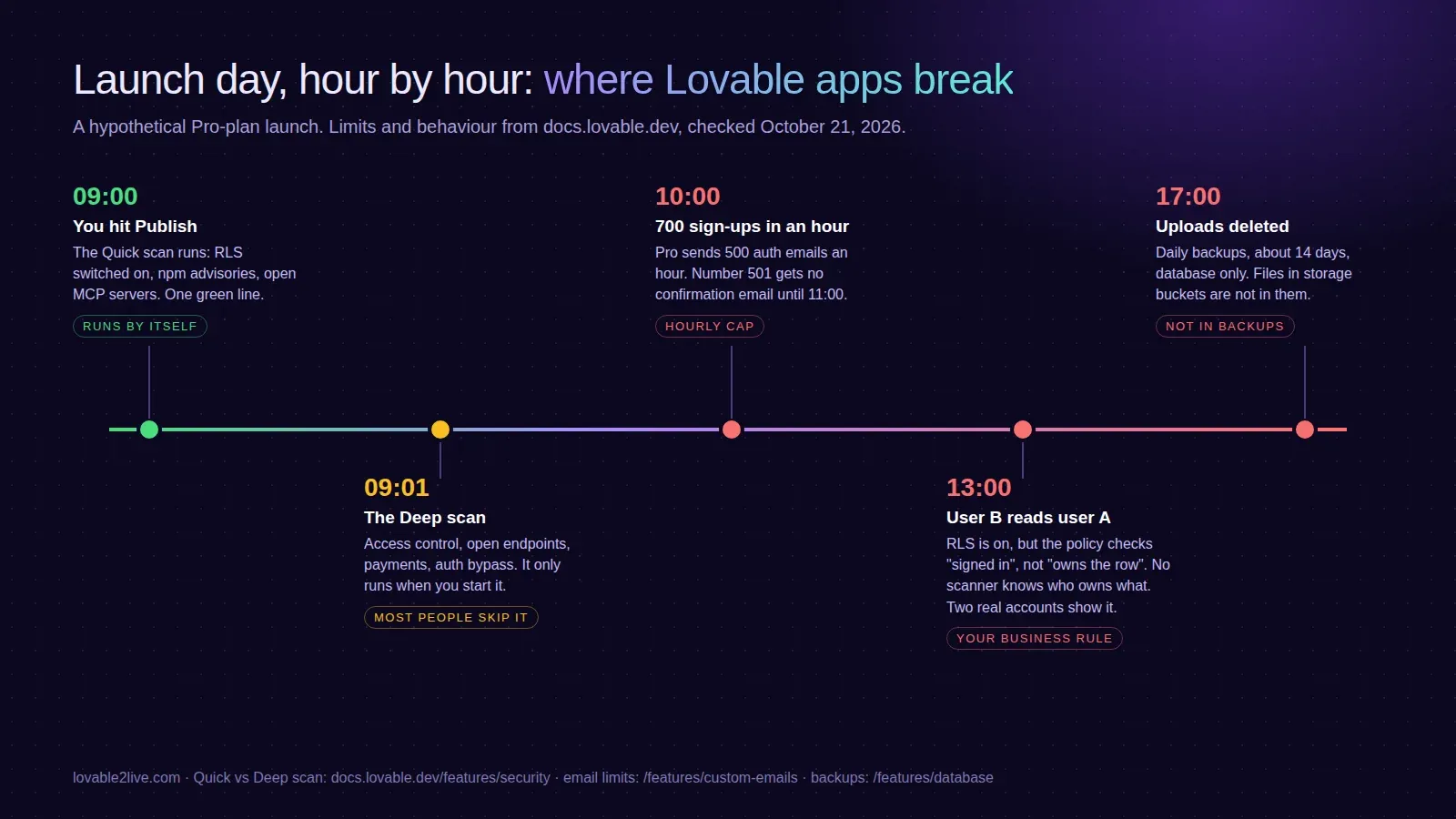
Lovable has two built-in scans now, and people mix them up. The Quick scan runs automatically every time you open the publish dialog. It looks at tables without row level security, policies that let everyone through, leaked-password protection being off, known vulnerabilities in your npm packages, and MCP servers exposed without auth. It takes seconds and shows one line in the dialog.
The Deep scan does not run on its own. You start it from the project’s Security view. It reads the whole codebase for access control holes, endpoints anyone can call, injection, secrets in the repo, payment logic a customer can tamper with and auth that can be bypassed. Lovable’s own security docs say these tools “do not replace a thorough security review”, and they recommend scanning first, fixing, then a pentest (Aikido, as a connector) before a major release.
Run the Deep scan. Fix everything marked Critical. It’s free and it catches the dumb stuff.
The part no scanner can do
A scanner can see that orders has RLS on. It can’t know that a customer should see their own orders, a shop owner should see orders for their shop, and nobody should see anyone else’s. That’s your business rule, and it lives in your head, not in the code.
So test it the boring way. Make two accounts. Log in as A, create data. Log in as B and try to read A’s data through the API, not just the UI. Open dev tools, copy a request, change the ID, send it again. The classic Lovable failures we look for:
- A policy that checks the user is signed in (
auth.uid() is not null) instead of checking they own the row. RLS is on, the Quick scan has nothing to say, and every signed-in user can read every order. - An
is_adminflag on theprofilestable that the row owner can update. One PATCH and you’re an admin. - Admin checks done in React only. The page hides the button, the API doesn’t care.
- An edge function with
verify_jwtoff that sends email. Congratulations, you run an open mail relay.
If that list makes you nervous, that’s what our security audit does: two real accounts against every policy, written up by severity.
Keys that shouldn’t be in the browser
Anything the frontend can read, a visitor can read. Stripe secret keys, OpenAI keys and the Supabase service role key (or the newer sb_secret_ key) belong in edge function secrets, never in a VITE_ variable or a constant in a component. The Deep scan looks for secrets in your code, which is good. It won’t catch the key you pasted into the chat three weeks ago that ended up in a config file you’ve since forgotten about, if it doesn’t look like a key. Search the repo yourself for sk_live, sk-, service_role and sb_secret.
Backups: know what you actually have
This one surprises people. On Lovable Cloud you get a daily database backup, kept for roughly 14 days, and you restore from More, Cloud, Database, Backups (database docs). Restoring rolls back schema and data together, so anything created after that backup is gone, and the app may stop matching the database if you changed the schema since.
And backups cover the database only. Files in storage buckets are not in them. If your app stores invoices, avatars or uploads, and someone deletes them, the backup doesn’t bring them back. For a lot of apps that’s fine. For an app where the uploads are the product, it isn’t, and you want your own copy somewhere.
This is also one of the reasons founders move the backend to a Supabase project they own, where point-in-time recovery is an option. That’s our Cloud to Supabase migration, if you get there.
Email limits on launch day
Lovable’s built-in email is decent now: branded auth templates, sending from a notify subdomain of your own domain, 50,000 transactional emails a month included on paid workspaces. But there’s an hourly cap. On Pro it’s 100 app emails and 500 authentication emails per hour (email docs). When you hit it, new emails are rejected until the hour resets.
Picture a launch post that does well. 700 people sign up in the first hour, the confirmation emails stop at 500, and 200 people are staring at “check your inbox” with nothing in it. Most of them don’t come back. If you expect a spike, either be on a plan with a higher cap, or send auth email through your own SMTP provider.
Domain, redirects, the boring bits
Custom domains are on paid plans only. Connect it, then go through every place the old lovable.app URL is hard-coded: auth redirect URLs, OAuth app settings in Google, Stripe webhook endpoints, links in your email templates. A sign-in that redirects back to yourapp.lovable.app after you’ve moved to yourapp.com is the most common “it worked yesterday” bug we see after a domain switch.
Then add error reporting. Sentry’s free tier is plenty for a new app and it takes about ten minutes. Without it, your users find the bugs and tell you on Twitter, or more likely, they don’t tell you at all.
What production ready doesn’t mean
It doesn’t mean a rewrite. Most Lovable apps we look at are a few days of work away from being safe to put real users on, not weeks. Fix the policies, move the keys, sort out backups and email, connect the domain, add monitoring. If you’d rather hand that list to someone, Lovable to production is the fixed-price version, and the free cost check tells you what running it will cost once it’s live.