How to Reduce Your Lovable Cloud Bill
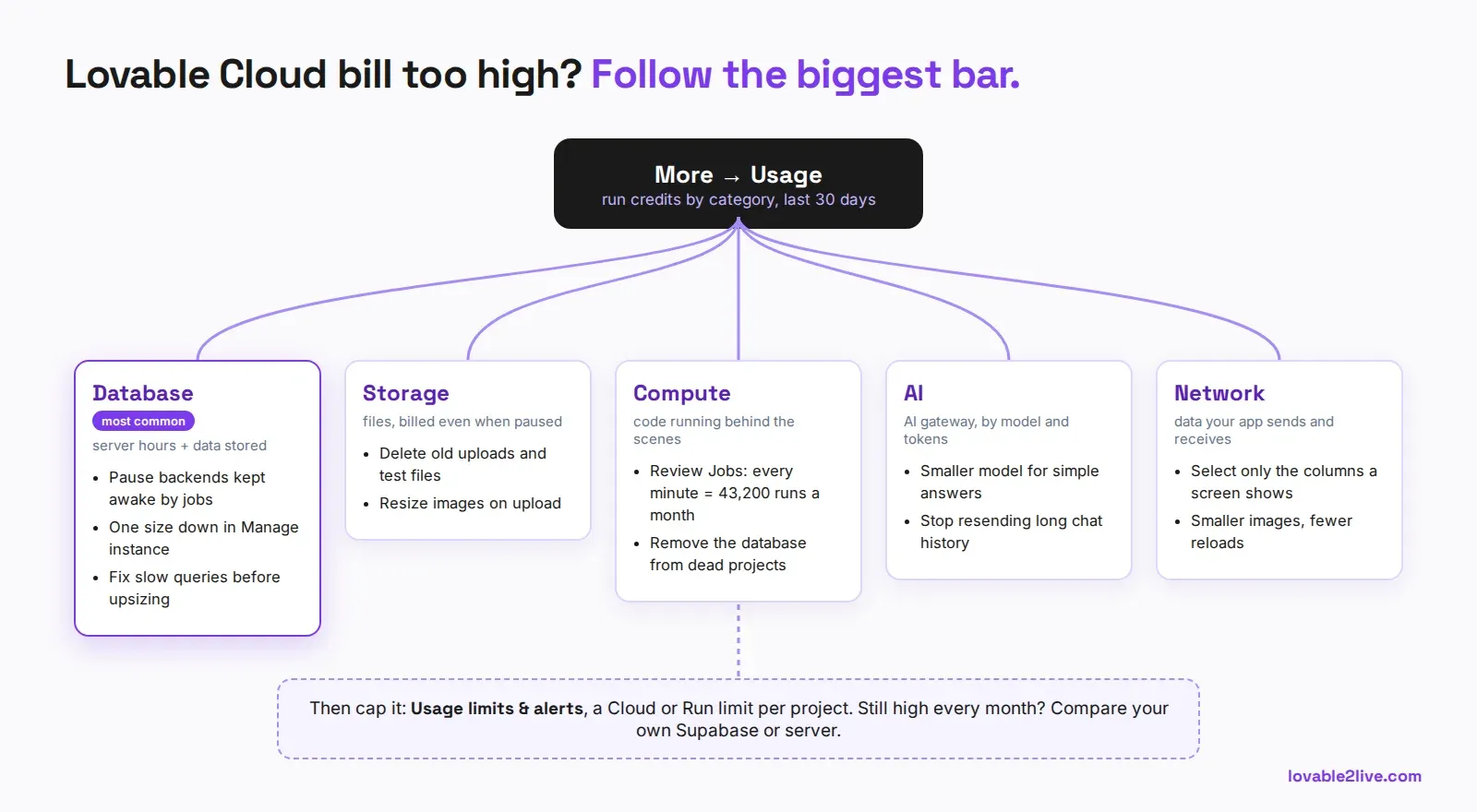
To reduce your Lovable Cloud bill, open the project’s More → Usage view first and find the biggest category: Database, AI, Compute, Network, Storage or Realtime. Then fix that one. In most projects we look at it’s the database server, and the cheapest fixes are pausing backends that never sleep, picking a smaller instance size, and deleting old files, all from More → Database → Manage → Settings (Lovable’s project usage docs, checked October 22, 2026).
Cloud usage is billed in run credits, from the same balance you build with. Free, Pro and Business workspaces get a 20-credit monthly Cloud grant and a 4-credit monthly AI grant first. Lovable calls both a temporary offering. Everything past them comes out of your general credits.
What the docs leave out (checked October 27, 2026): those credits cost real money. On Pro a top-up is $15 for 50 credits, so every run credit past the 20-credit Cloud grant is worth about $0.30, and a backend that uses 120 run credits a month eats about $30 of credits you could have built with. If the database server is still the biggest line after the fixes below, the other way to cut the bill is to move the backend out of Lovable Cloud: a Supabase Pro project is $25 a month with a Micro instance included, and your app traffic stops spending Lovable credits. We do that move for $150, $350 or $600 one time, by table count, usually in 1 to 2 days (Cloud to Supabase migration). The free Lovable cost check runs those numbers for your own project.
Find what you’re actually paying for
Don’t start by resizing anything. The Usage view splits a project’s run credits by category and sorts them from highest to lowest, with the last 30 days by default and up to 90. It also shows how much of that your monthly grants covered.
If a project burned more than 5 run credits in the last 7 days, workspace owners and admins get an Optimize your usage button under the chart. It starts a chat where Lovable reads the project’s recorded usage and suggests fixes. It’s worth one message. Just read what it proposes before you approve anything, because “resize the instance” is an easy answer and not always the right one.
Database: the usual culprit
The database server line depends on the instance size and how long it runs. Paid plans can pick Tiny, Mini, Small, Medium, Large or X-Large, and the Manage instance dialog shows an estimated monthly cost under each size, based on your last 30 days of usage (database size docs).
Two things to know before you touch it. A resize restarts the instance, so there’s a short interruption. And if your project sits on 2X-Large, that size can’t be picked again once you move off it. So step down one size at a time, on a quiet hour, and watch the app for a day.
Often the instance isn’t too big, it’s doing too much work. A dashboard that runs eight queries per card, a list that loads every row and filters in the browser, a missing index on the column every page filters by. Ask Lovable to find the slowest queries before you pay for a bigger box. We’ve seen projects move up two sizes to hide a single unindexed user_id filter.
Backends that never go to sleep
Lovable pauses a project’s backend automatically after about 7 days without activity. The catch: projects with scheduled jobs or other background activity don’t count as inactive, so they never get paused (pause docs). That old prototype with a nightly cron job is running every hour of every day.
Pause it yourself from Database settings. Your data stays, and you can wake it up later. Be aware that while it’s paused the published app can’t sign anyone in, read data or serve files, and edge functions for payments, AI or email stop too.
If a project doesn’t need a backend at all anymore, Remove database stops every Cloud charge for it. It also deletes the database, its backups, the user accounts and every stored file, permanently. Export first.
Storage keeps billing while you sleep
Stored files count against your credits even while a project is paused. Old uploads, test images, generated files nobody opens: delete them. If your app serves big images, resize them on upload instead of sending the original to every visitor, because the same file then costs you twice, once in Storage and again in Network every time it loads.
Jobs, compute and AI
Scheduled jobs add up quietly. A job every minute is 43,200 runs a month. Check the project’s Jobs and ask whether each one really needs that schedule.
On the AI side, the AI gateway charges by model and tokens. Long chat histories sent on every message, a big model for a yes/no classification, a whole document pasted into each prompt: those are the usual leaks. Use a smaller model where the answer is simple and trim what you send.
Put a cap on it
On paid plans, owners and admins can set limits in Workspace settings → Usage limits & alerts (usage limits docs). A limit can watch Run, Cloud or AI credits for one project, per day or per month, and either alert you or pause Cloud when it’s reached. Set an alert-only limit at about twice your normal month on every live project. A blocking limit on a production app means the app pauses when it hits it, so think hard before turning blocking on there.
When the bill is still too high
At some point you’re paying Lovable to run a database you could run yourself. Once a project’s Cloud spend is steady and real, moving the backend to your own Supabase project, or the whole app to your own server, is often cheaper, and you keep building in Lovable either way.
Our free Lovable cost check reads your GitHub repo and shows what your app would cost on Lovable Cloud, on your own Supabase and on a server, side by side. If moving wins, Lovable Cloud to Supabase starts at $150, fixed price, and your own server is $500 plus that move.