Lovable vs Bolt After Your App Has Users
For a brand new idea, Lovable vs Bolt is close to a coin toss, and you should pick the one whose editor you enjoy. For an app that already has users, logins and a database, it isn’t close at all: switching builders moves your code and leaves your data behind. Most of what goes wrong in a Lovable to Bolt move (or the other way) comes from not knowing that before you start.
We fix and migrate Lovable apps for a living, so we get the “should we just move it to Bolt?” question a lot. Here’s how the two compare in October 2026, checked against both companies’ own pricing and help pages.
What each one charges
Lovable Pro is $25 a month for 100 credits plus 5 a day. Since June 1, 2026 those same credits also pay for the live app on Lovable Cloud: database, storage, traffic, the AI calls your app makes. Run out and the backend pauses. Your Lovable pricing bill is really two bills in one balance, which is the part people miss.
Bolt Pro is $18 a month on the yearly plan ($216 a year; the page shows $300 a year as the monthly-billing price) and starts at 10 million tokens a month. Unused tokens roll over on paid plans, and there’s no daily cap, unlike the free plan’s 300K a day. Hosting is included, custom domains need Pro, and so does using Supabase instead of Bolt’s own database. That’s all on Bolt’s pricing page.
So on paper they cost about the same. In practice the bill depends on how you work. Tokens get eaten by big files and long conversations, credits get eaten by messages. A founder who makes lots of small “move this button” edits tends to burn tokens slower on Bolt. One who asks for big features in one go usually finds Lovable cheaper. Neither company makes this easy to predict in advance, and we’ve stopped trying to.
How they build
Lovable is a chat with a preview and a visual editor. You can turn on GitHub sync and edit code, but the product nudges you toward prompting. Bolt runs the whole project in your browser on StackBlitz’s WebContainers, with the file tree and a terminal right there. If you or someone on your team actually reads code, Bolt feels less like a black box. If nobody does, that’s not an advantage, it’s just more screens.
The other real difference is mobile. Bolt has an Expo integration for iOS and Android apps, with publishing to the App Store and Play Store, and it works best if you say “mobile app” in the very first prompt. Lovable builds web apps. Getting a Lovable app into the stores means wrapping it (Capacitor) or rebuilding the screens natively, which is what our Lovable to app service does. If the store app is the product, not an add-on, that alone can decide it for Bolt from day one.
The backend is where it gets serious
Both default to their own managed database. Lovable has Lovable Cloud, which is Supabase underneath, or you can connect your own Supabase project. Bolt has Bolt Database as part of Bolt Cloud, or Supabase on paid plans, chosen when you create the project.
Read that last bit again. Bolt’s own database docs say: “There’s currently no supported way to migrate an existing Bolt database to Supabase.” So the backend choice you make in the first five minutes on Bolt sticks. On Lovable you can move from Cloud to your own Supabase later (it’s work, but it’s a known path, and we do it in 1 to 2 days).
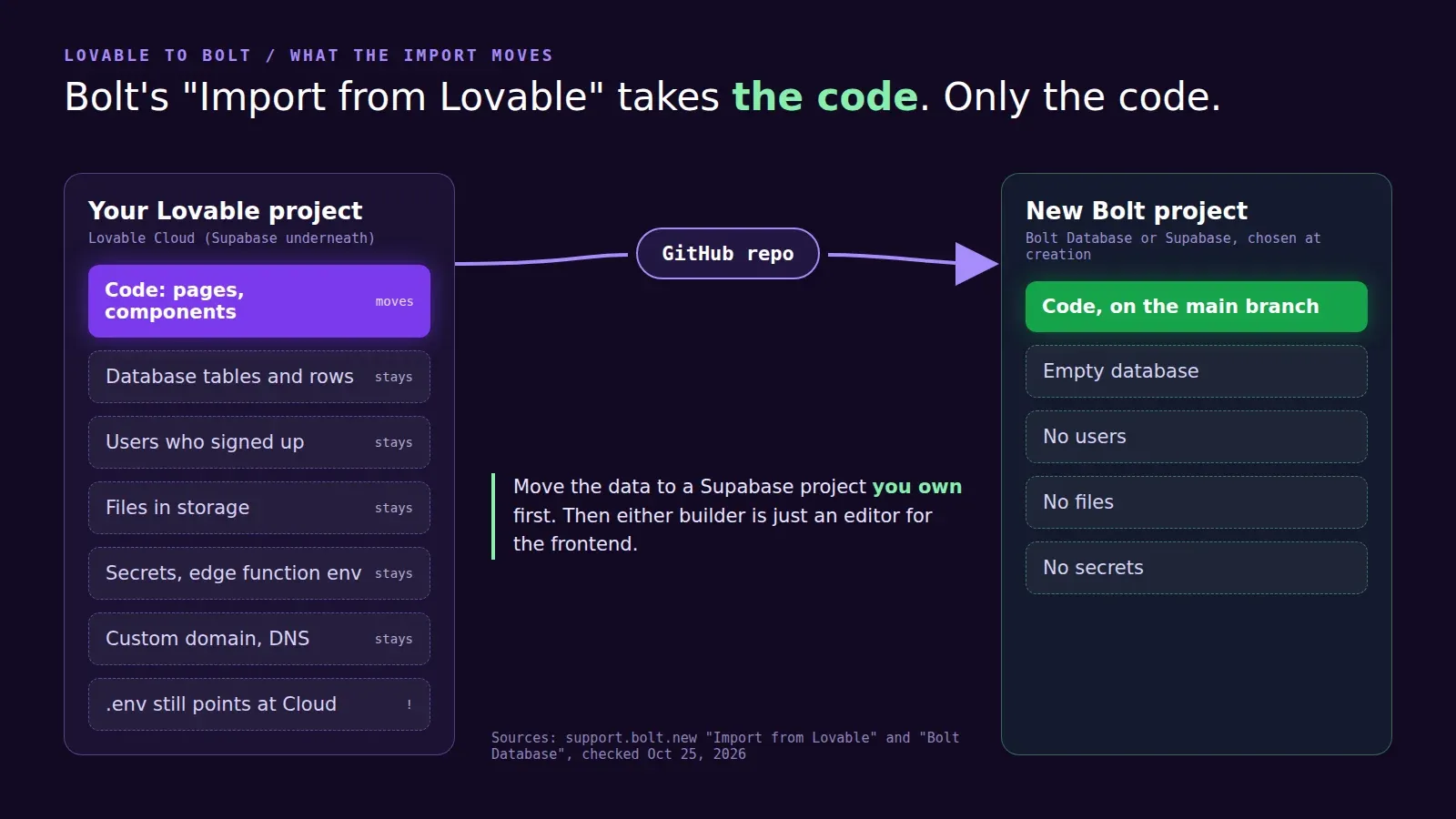
What “Import from Lovable” actually imports
Bolt has an Import from Lovable page. The steps: sync your Lovable project to GitHub, connect Bolt to GitHub, import the repo. That’s the code. Not the tables and their rows, not the users who signed up, not the files in storage, not your API keys and edge function secrets, not the domain.
We had a founder come to us in September with a Lovable app, about 900 users, who’d done exactly this over a weekend. The imported frontend looked right in Bolt’s preview. It was still pointed at the old Lovable Cloud project through its environment variables, so for two days the “new” app was reading and writing the old database, and nobody noticed until the Lovable credits ran low and the backend paused. Both versions went down at once. The fix was boring: move the data to a Supabase project they own, point whichever frontend they liked at it, done.
That’s our general advice, whichever builder wins. Get the database into a Supabase project in your own account first. After that the builder is just an editor for the frontend, and you can switch it any time without touching users or data. Our Cloud to Supabase migration is a fixed-price version of that move.
Which one we’d pick
- A new web app, nothing live yet: either. Try both for an afternoon, keep the one you like.
- A native mobile app is the main product: Bolt, because of Expo.
- You already have a Lovable app with users: stay on Lovable for the frontend, move the backend to your own Supabase, and stop thinking about it. A rebuild in Bolt costs weeks and fixes nothing that’s actually wrong.
- You want a developer in the code with you: honestly, neither. Sync to GitHub and work in an editor. We wrote about that in our Lovable alternatives post.
Not sure what your current Lovable setup really costs you per month? The free Lovable cost check reads your repo and works it out. If you’d rather talk it through, get in touch.